Structured alternative
Anchor vs Structured. Two ways to plan a day.
Anchor suits people who'd rather plan blocks of time and fill them with tasks, instead of giving every task its own slot as Structured does. It runs on iPhone and Mac with no account, and Super Anchor is a one-time purchase. Its main limitation: no iPad until the end of 2026, and no Apple Watch, Android or web app. Structured has all four.
 By Alex Pluda
Choose Anchor if
- You'd rather plan the time first and decide what fills it later
- You want one block to hold several tasks, from any project
- You live in Apple Reminders and want changes to go both ways
- You'd rather pay once, with no account
Choose Structured if
- You think in single tasks, each with a start time and a length
- You need iPad today, Apple Watch, Android or the web
- You want subtasks and repeating tasks
The main difference
Tasks on a timeline, or blocks that hold tasks.
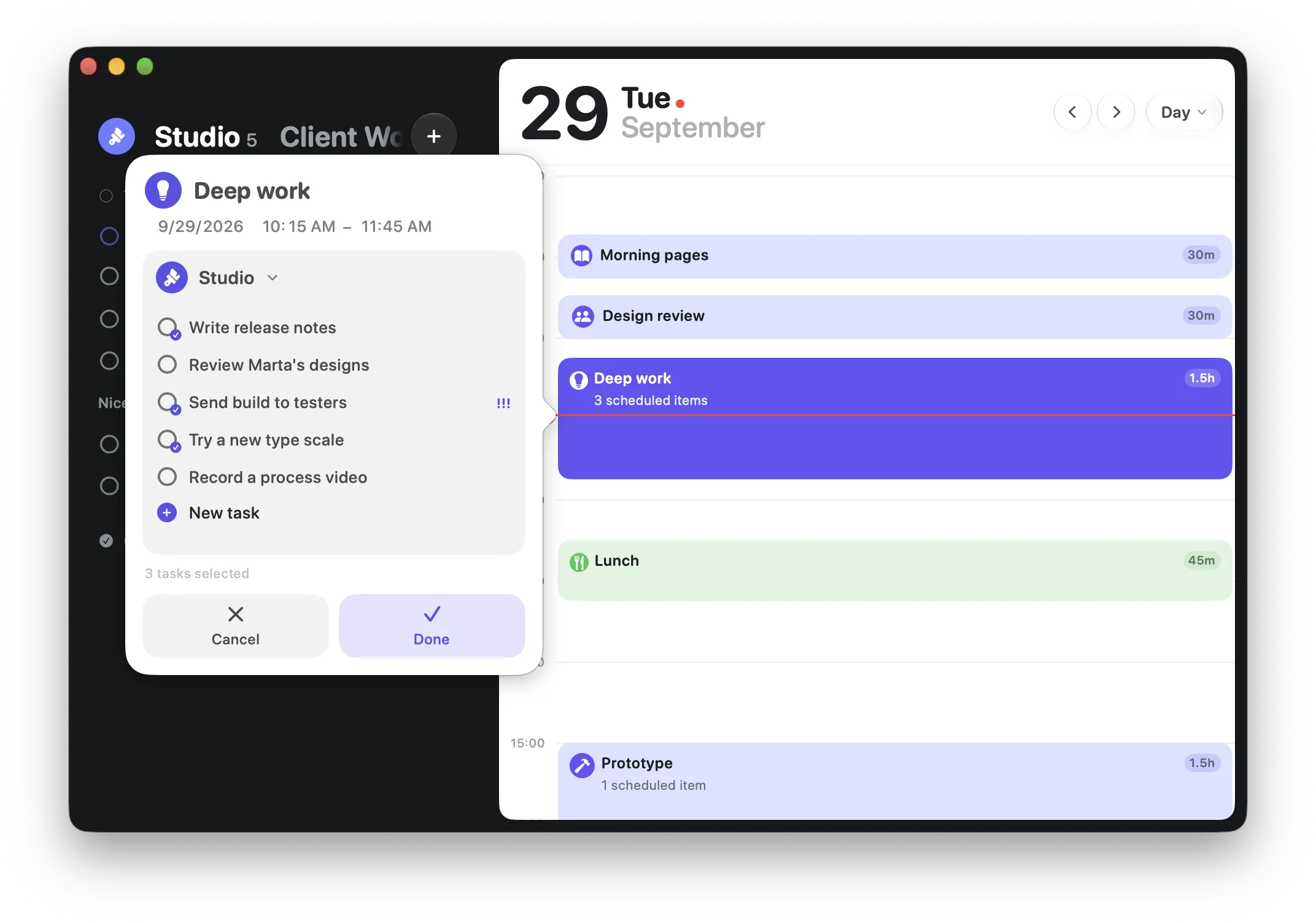
In Structured, the task is what sits on the timeline. “Write report, 9:00, 45 minutes” takes its own slot, and a checklist of subtasks can go inside it. Tasks without a time wait in the inbox.
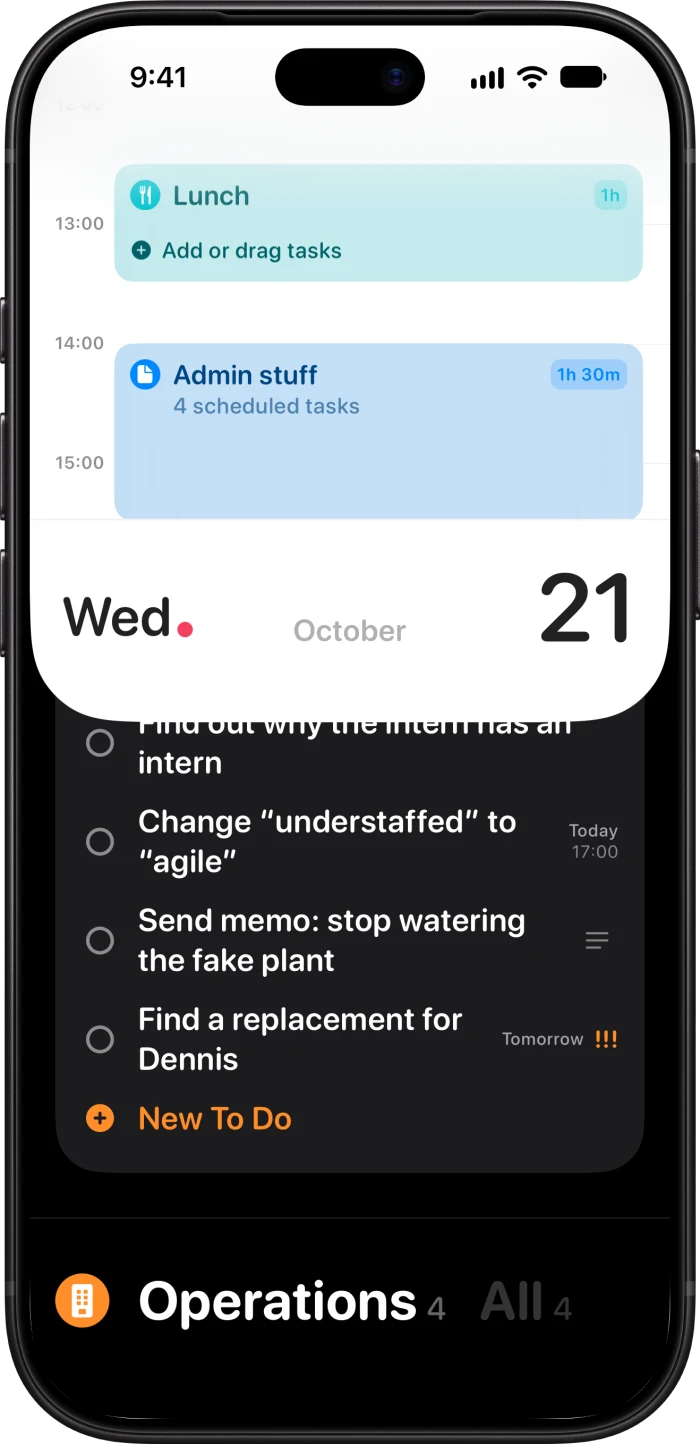
In Anchor, the timeline holds blocks: Deep work from 10:15 to 11:45, Admin after lunch. Your tasks live in lists, and you choose which ones go into each block. A block can hold one task or ten, from different projects, and a bigger task can sit in several blocks.
So in Structured you plan by giving each task a time. In Anchor you give the day a shape, then fill it. When a block ends, nothing is marked late: you move what's left to another block.
At a glance
Side by side.
| Feature | Anchor | Structured |
|---|---|---|
| How a day is planned | Blocks of time, with tasks inside | Each task gets its own time and length1 |
| In one slot | As many tasks as you like, from any project | One task, with a checklist of subtasks4 |
| Tasks with no time yet | Any project can be your inbox, plus Today | Inbox5 |
| Repeats | Repeating blocks | Repeating tasks (Pro)2 |
| Apple Calendar | Events show as blocks. Your changes go back to Calendar | Events show on the timeline (Pro), read-only6 |
| Apple Reminders | Both ways: lists, tasks, dates, notes and ticks | Import (Pro). Edits go back; new tasks don't7 |
| Account | None | None to start. Web, Android and syncing with them need a Structured Cloud account810 |
| Sync | Through your own iCloud | Structured Cloud by default for new users. iCloud still works between Apple devices91 |
| Devices | iPhone and Mac. iPad coming by the end of 2026 | iPhone, iPad, Mac, Apple Watch, Vision Pro, Android and web11011 |
| On Mac | Native Mac app. Up to five days side by side, your block in the notch, quick add from any app | Mac app for macOS 15 or later1 |
| Focus | Focus mode for the current block, Live Activity, Dynamic Island | Focus timer with Pomodoro, Live Activities2 |
| AI | Optional MCP server that runs on your Mac | Structured AI (Pro, built on OpenAI). MCP server through Structured Cloud21 |
| Price | Free on iPhone. $49.99 once for the Mac app and more, $29.99 with the first-install offer | Free core. Pro monthly, yearly or $99.99 lifetime31 |
Where Structured is better
More devices
iPad, Apple Watch, Vision Pro, Android and the web, which also covers Windows. Anchor is on iPhone and Mac, with iPad coming by the end of 2026.
A task with a time
If you think in single tasks, like “email at 9:00 for 20 minutes”, Structured says it directly. In Anchor you'd make a block for that one task.
Subtasks and repeating tasks
A Structured task can hold a checklist and repeat on its own. In Anchor, blocks repeat instead, and sections group the tasks in a list.
A bigger free version
Widgets, Live Activities, sync and the focus timer are free in Structured. In Anchor, the Mac app, widgets and Live Activities come with Super Anchor.
Where Anchor is better
Blocks that hold tasks
Plan the time first and fill it later. Mix projects in one block, spread a big task over several, and move what's left when a block ends.
Reminders, both ways
Pick your lists and each becomes a project. Tasks you add in Anchor show up in Reminders, and ticks, dates and notes sync in both directions.
No account, your iCloud
There's nothing to sign up for. Sync goes through your own iCloud, and everything works offline.
Pay once
$49.99, once, for iPhone and Mac. No subscription to keep track of.
Siri and smart capture
Type “Call Andrea tomorrow 9am @Work !!” and Anchor fills in the date, the project and the urgency. Or just say it: Siri adds tasks hands-free, and voice capture uses Apple Intelligence to turn what you say into tasks.
A native Mac app
Up to five days side by side, the current block in the notch with its countdown, quick add from any app, and an MCP server for AI apps that stays on your Mac.
Pricing
What it costs over time.
Anchor is free on iPhone. Super Anchor is a one-time $49.99 for the Mac app, widgets, Live Activities, Calendar and Reminders sync, smart dates and voice capture, and the first time you install Anchor it's $29.99. Structured's core is free, and Pro is monthly, yearly or lifetime. Prices from the US App Store.123
| Plan | 1 year | 3 years | 5 years |
|---|---|---|---|
| Super Anchoronce, first-install offer | $29.99 | $29.99 | $29.99 |
| Super Anchoronce | $49.99 | $49.99 | $49.99 |
| Structured Proyearly, $29.99 | $29.99 | $89.97 | $149.95 |
| Structured Prolifetime | $99.99 | $99.99 | $99.99 |
With the first-install offer, Super Anchor costs the same as one year of Structured Pro, and nothing after that.
Switching
Moving from Structured.
There's no direct import, but most of what matters comes across through Apple's own apps.
Try them side by side
Anchor is free on iPhone, and a 7-day Super Anchor trial covers the rest, Mac included. Plan a few days in both before you decide.
Bring your Reminders
If you imported Reminders lists into Structured, turn on Reminders sync in Anchor and pick the same lists. Each becomes a project, with its tasks, dates and notes.
Copy what lives only in Structured
Tasks you created in Structured don't go back to Reminders, so add the open ones in Anchor. It reads dates, @projects and ! for urgency as you type.
Turn on Calendar
Pick the calendars you want, and their events show up as blocks.
Turn routines into repeating blocks
A morning routine or a weekly review becomes a block that repeats every day, week or month. You decide each time which tasks go in it.
FAQ
Questions about switching.
Not directly. Tasks that came from Apple Reminders come across through Reminders sync, and events through Calendar sync. Anything you created only in Structured needs to be added again.
Yes: make a block for it. A block can hold just one task. With Siri or Shortcuts, “Schedule task” makes a block named after the task.
Over time, yes. Super Anchor is $49.99 once, or $29.99 with the offer the first time you install Anchor. That's the price of one year of Structured Pro ($29.99 a year in the US), and less than a third of its $99.99 lifetime plan. Both apps have a free version.
Anchor is for iPhone and Mac today, and iPad is coming by the end of 2026. There's no Apple Watch, Android or web version, so if you need one of those, Structured is the better fit.
No. Anchor shows your Calendar events as blocks and sends your changes to them back to Calendar, but blocks you make in Anchor stay in Anchor. Structured doesn't send its tasks to Calendar either.
Not inside the app. On Mac, an optional MCP server lets Claude, Codex, Cursor and other AI apps read and plan your tasks. It runs on your Mac and stays off until you turn it on. On iPhone, voice capture uses Apple Intelligence to turn what you say into tasks.
Sources
How this was checked.
I make Anchor, so I'm not neutral. I've tried to be fair: every claim about Structured comes from its own App Store listing, help centre or release notes, and every claim about Anchor from the app itself.
Apps change. If something here is out of date, write to me at anchor@pool.studio and I'll fix it.
- Structured on the App Store (US): description, prices, version history
- What features in Structured are free and what features require Structured Pro?
- What is Structured Pro?
- How to create (smart) subtasks
- How to use the inbox
- How to import external calendars
- How to import to-do lists into Structured
- How to log out & change email (no account required)
- Can I still use iCloud instead of Structured Cloud?
- Is Structured available on web, Android, Windows, PC, or Mac?
- Structured on Google Play
Structured is a trademark of unorderly GmbH. Anchor is not affiliated with or endorsed by unorderly GmbH.